I use coding agents in the terminal every day. The work they're best at is plain: read a codebase, make a change across several files, run the tests, read the failures, fix them, run the tests again.
Look at what that needs. Files, git, a test runner. Nobody built an integration for any of it. It was all already there, in the terminal. That is most of the reason so many agents ship as command-line tools.
The tools are already there
A web app agent can only use what someone wired into it. Every tool needs an integration, a schema, a button, a permission screen.
A terminal agent starts with everything you have installed. git, the test runner, the build, grep, curl, the cloud CLIs, your own scripts. If you can run it, the agent can run it.
Anthropic's Claude Code best practices lean on this directly. They suggest telling the agent to use CLI tools such as gh, aws and gcloud, call CLI tools "the most context-efficient way to interact with external services", and note the agent can learn a tool it doesn't know by reading its --help.
The second reason is the format. A CLI is text in and text out. So is a model. Command output, error messages and test results are already in the shape the model reads best.
The third reason is the loop. A coding agent is only as good as its check. The same guide's first piece of advice is to give the agent a way to verify its own work, such as a test suite or a build that passes or fails. In a terminal, that check is one command away.
Why builders ship them
For the person building the agent, a CLI is the cheapest way to ship.
- Quick to build. No UI, no hosting, no login screens. The loop, the tools and a prompt.
- Easy to open-source. OpenAI's Codex CLI and Google's Gemini CLI are both open source under Apache 2.0.
- Runs with the user's own key or account. The builder carries no token bill.
- Keeps the user's data on the user's machine. I wrote about that trade in server-side vs client-side agents.
The risk: it can do anything you can
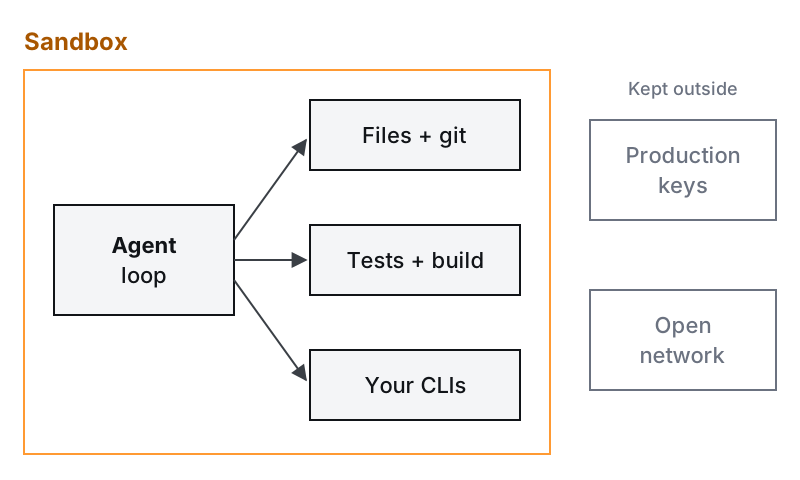
The same property that makes a terminal agent useful makes it dangerous. An agent with your shell can do anything you can. Delete files. Push to main. Run a script it found on the internet. Read the .env file with your production keys.
And it doesn't need to go wrong on its own. Models follow instructions wherever they find them, including in a README, an issue comment or a web page the agent just fetched. Simon Willison calls the dangerous mix the lethal trifecta: access to private data, exposure to untrusted content, and a way to send data out. A terminal agent with network access has all three by default. I go deeper on this in security for agentic workflows.
So my rules are short:
- Ask before writes. Reading is cheap to allow. Edits and commands that change things get a yes from you, until you've decided which ones are safe.
- Run anything unknown in a sandbox or container. Limit the files it can write and the network it can reach.
- Never give it production credentials. Not in the environment, not in a file it can read.
What the tools themselves do
The terminal agents have converged on the same rules, which is a good sign they're the right ones.
Claude Code lets reads inside your working directory run without asking. In its Manual mode, file edits and most shell commands need your approval. Newer versions start in an auto mode, where a separate classifier model reviews actions instead of you and blocks the ones that look risky. There is also a mode that skips the checks, and the docs say to use it only in isolated environments like containers or VMs. Its sandbox uses the operating system to limit which files and network domains a shell command can reach.
Codex CLI runs commands in an OS-enforced sandbox, limited by default to the current workspace, with network access turned off. In its auto mode it still asks before editing files outside the workspace or running commands that need the network. The flag that removes both the sandbox and the approvals is labelled not recommended.
Gemini CLI can run tools inside macOS Seatbelt or a Docker or Podman container, so shell commands and file writes stay away from the host.
Claude Code and Codex both ship a way to turn all of this off. That option exists for running inside a throwaway container, not on your laptop with your keys in the environment.
Why we're planning QuizzaHut 2 as a CLI
Job seekers already juggle sheets, docs and ChatGPT tabs. I'm building the new QuizzaHut as an agentic CLI for the job hunt for the same reasons as above. It's quick to build. It's easy to open-source. It runs with your own key. And it keeps your resume and your applications on your machine.
A web app can come later, if people use it. A CLI is the cheapest way to find out whether they will.
If you're building an agent for your own team rather than for developers, the shape changes: shared data, shared keys, and a server in the middle. That's the work we do in agentic automation, and the checks it needs are in why production agents are rare.
One thing to do this week
Pick one task you'd normally give your coding agent. Run it with the agent's sandbox on and the network off, in a fresh clone with no .env file. Write down every time it asks for more.
That list is the real set of permissions your agent needs. Everything it never asked for, it shouldn't have.