The first version was one endpoint. Build a prompt, call the model, return the text. It worked in the demo, and it is how most of us start.
This is about what we added to it, step by step, on a production AI platform for U.S. legal documents, and why each piece was there. The model call stayed one line. Everything else grew around it.
What broke first
The shape of the output broke first.
The frontend expected a field. One time it got a paragraph. The next time it got a markdown table. Sometimes it got an apology. Every one of these was a reasonable thing for a model to write, and none of them was what the code needed.
Then came timeouts. When the input was long, the provider was sometimes slow, and the request just hung.
Neither problem raised a clean error at the point where it went wrong. That is the pattern to expect from now on.
Give the output a type
The rest of the system can't work with "mostly right". A database column, a UI component, a downstream job: each one needs a known shape.
Before we added types, every place that used the output had its own parsing and its own way of failing. One component stripped code fences. Another looked for the first curly brace. When something broke, it broke in a different place each time.
Once we asked for structured output and validated it against a schema, a bad answer failed in one place, with a reason, and we could retry it.
The major providers now support this directly. You pass a JSON schema and the model is constrained to it: OpenAI's Structured Outputs, Anthropic's structured outputs and Gemini's response schema all work this way. Use it, and still validate on your side. Anthropic's docs say plainly that a refusal, or a response cut off at the token limit, may not match your schema. OpenAI's docs also cover refusals and incomplete responses separately. So check why the call stopped, and run your own validation (Pydantic, Zod, whatever your stack uses) on every response.
A schema guarantees the type of every field. It says nothing about whether the value is true.
Valid JSON, wrong answer
This is the hard one.
The JSON parses. Every field has the right type. The date is a real date. It is just the wrong date.
Retrying the same prompt usually gives the same wrong answer. The model read the input the same way both times.
What helps is checks that know the domain. Does this date make sense next to the other dates? Does this value actually appear in the source document? Is this id one of the ids we sent? These checks are ordinary code, and they are cheap. When one fails, you have two good moves: ask again and include the reason it failed, or send the case to a person.
"I don't know" has to be a valid answer. If every field in your schema is a required string, you have told the model that an empty answer is not allowed, and it will fill the field with something plausible. Give it a way out: a nullable value with a reason, or a status such as found, not present or unreadable. Then include test inputs where the value really is missing, and check that it uses the way out.
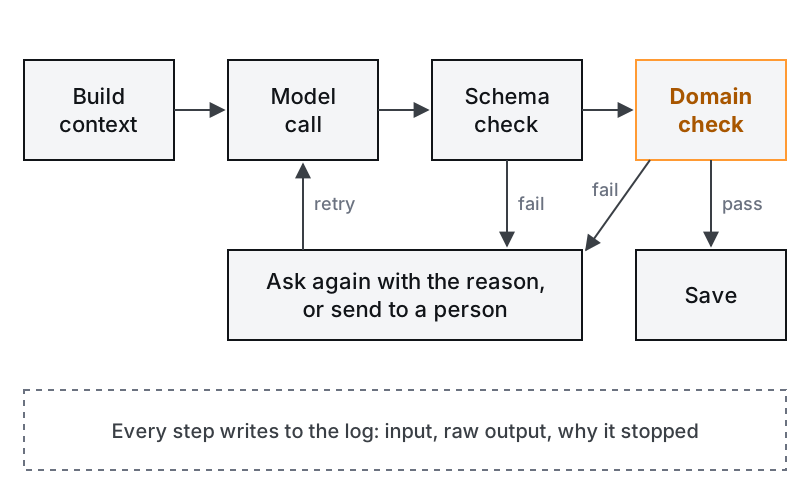
Timeouts and retries
An LLM provider is an integration like a payment gateway. Treat it the same way. Set a timeout on every call. Retry rate limits and server errors with backoff. Don't let one slow call hold a request thread forever. Michael Nygard's Release It! makes the general case for this: integration points are where systems fail, and a missing timeout turns a slow dependency into your outage.
Retries also need a limit. One or two repair attempts are enough. If it still fails, the input is usually the problem, and a person should look at it.
Then the request outgrows itself
After types, we added streaming over SSE, because some replies were slow and users needed to see the answer arrive. I wrote that part up in why chat needs SSE.
Then the feature needed multi-step reasoning: 10 to 15 LLM calls for a single user request. At that point the work can't live inside one HTTP request anymore. It moved to queues and background workers, and the request only starts the job and reports on it.
Each step was added because something broke without it. None of it was planned on day one.
The list a beginner doesn't see
Here is everything around the call, as it ended up:
- The prompt, kept as versioned code. Not a string someone edits in place. When behaviour changes, you need to know which prompt produced it.
- The code that decides what context goes in. Which documents, which parts, in what order. This is where most wrong answers start.
- The schema and the validation. Shape first, then domain checks.
- Timeouts and retries, with limits.
- Streaming, so slow answers don't look broken.
- A log of every input and output. The full prompt, the raw response, the model version, why it stopped, how long it took.
- Cost per call. Tokens in and out, per feature.
- Background jobs for the slow parts.
- A set of test examples to run every change against, including the ones where the answer is "not present".
What to skip in a prototype, and what never
For a prototype I'd skip the queue, caching and cost tracking. They matter at scale, and a prototype has no scale yet.
I'd never skip the schema and the log of every input and output. Without the log you can't tell why it failed the first time a user complains, and that happens in week one. You will want to know: did the model get the wrong context, or did it get the right context and answer badly? Only the log can tell you.
Turning a working demo into a system that holds up is most of the job. It is what we do in prototype to production, and for document-heavy work, in AI document workflows.
One thing to do this week
Pick one LLM call in your codebase. Make it write one log row per call: prompt version, model id, full input, raw output, why it stopped, latency. Then read twenty of those rows by hand.
The first user complaint is coming. When it does, you want to read exactly what the model saw.