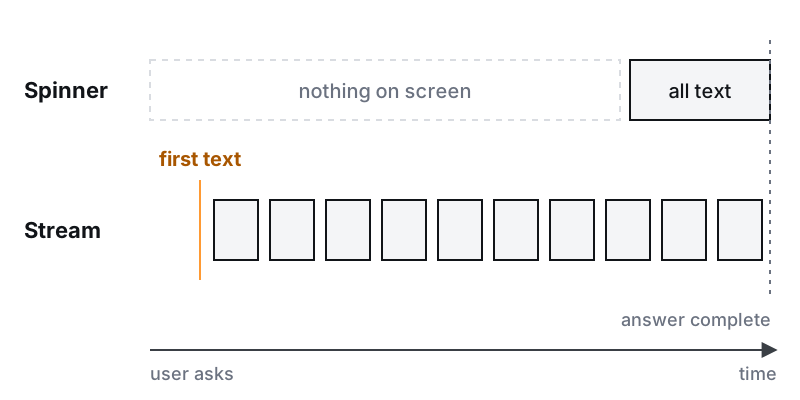
Before we added streaming, the user typed a question and watched a spinner for a long time.
Users thought it was broken. They refreshed the page, or clicked the button again, and that started a second model call for the same question. The complaint we heard was "it's slow", even when the answer at the end was good.
This was on a production AI platform for U.S. legal documents that we built. Some replies were slow, and the model was already producing the text piece by piece. We were just holding it back until the end.
Same wait, different feeling
Streaming doesn't make the answer finish sooner. It changes when the user sees the first part of it.
Chip Huyen's AI Engineering splits latency into two numbers: time to first token, and time per output token after that. Two systems with the same total time can feel very different, depending on how fast that first token shows up. A spinner hides both numbers. A stream shows the first one, and the first one is what tells the user the system is working.
Why SSE and not WebSockets
Chat is mostly one direction. The user sends one message. The server sends a long answer back.
Server-sent events do exactly that. It is one HTTP response that stays open, with the server writing small text events as they happen. It is plain HTTP, so your existing auth, routing and load balancer mostly keep working. The browser's EventSource reconnects on its own if the connection drops. If your events carry an id, the browser sends the last one back in a Last-Event-ID header when it reconnects, so the server can continue from where the user left off.
The model providers use the same format. Anthropic's Messages API streams its responses as server-sent events. Your backend reads one SSE stream from the provider and writes another to the browser.
WebSockets make sense when both sides talk all the time: collaborative editing, a voice agent, a client that keeps sending small messages. You get a two-way channel, and in exchange you write your own reconnect and resume logic.
Two details to know before you pick SSE:
- EventSource only sends GET requests, and can't set custom headers. MDN documents one option, credentials. So either send the message with a normal POST and then open the stream, or read the stream with
fetchand parse the events yourself. Don't put a bearer token in the URL, where it ends up in logs. - HTTP/1.1 limits open connections. MDN notes that browsers allow only six open SSE connections per domain over HTTP/1.1, across all tabs. A user with several tabs open will hit it. Over HTTP/2 the limit is negotiated and much higher.
What a proxy does to a stream
A stream that works on your laptop can arrive all at once in production. Something between your server and the user may collect the whole response before passing it on.
Nginx is a common example. proxy_buffering is on by default, which means it reads the response into buffers rather than passing each piece through as it arrives. You can turn it off for the streaming route, or have your app send the X-Accel-Buffering: no header on that response. Check every layer you have: CDN, load balancer, ingress, and any compression middleware.
The second problem is idle timeouts. Nginx closes a proxied connection if the server sends nothing for 60 seconds by default. An AI step that thinks quietly for a while can cross that line. The SSE spec has a simple answer: lines that start with a colon are comments, and the client ignores them. Its authoring notes suggest sending one every 15 seconds or so to keep the connection alive.
Stream steps, not just tokens
Later, a single request on the platform needed 10 to 15 LLM calls. Streaming tokens only helps with the last one. Until that last call starts, there is no answer text to stream.
So you stream steps. Each step sends an event: "reading the documents", "checking the dates", "writing the answer". The user sees work happening. You also get a free record of where the time goes, because every event has a timestamp.
The SSE format already supports this. Each event can have a name, so step events and token events can travel on the same stream, and the frontend handles each kind differently.
When the user closes the tab
If the work runs inside the request, closing the tab does one of two things. The work dies with the connection, or it keeps running and you pay for an answer nobody sees.
That is one reason the work moves to a background job. The request starts the job and returns. The job keeps going whether or not anyone is watching, and it saves its result and its progress. The SSE stream only reports what the job is doing. When the user comes back, they see the saved result, or they reconnect and pick up the live stream where it was.
This split pays off in other places too. Retries, cancel buttons and restarts after a deploy all get easier when the job, not the HTTP request, holds the state. If you are moving a chat or agent feature from a demo to something people use every day, that is the work in prototype to production and agentic automation. The step before streaming is getting the call itself right: see what you build around an LLM call.
One thing to do this week
Open your chat feature in the browser, with the network tab open. Ask a question with a long answer. Watch whether the response grows while the answer is written, or lands in one piece at the end. Then do the same in staging, behind the same proxy as production.
If the text arrives all at once, the stream works and something in the middle is holding it.